
Beethoven – Classical Music4.0.0 - Google Play
You'll be able to see results in few seconds.
Publisher Description
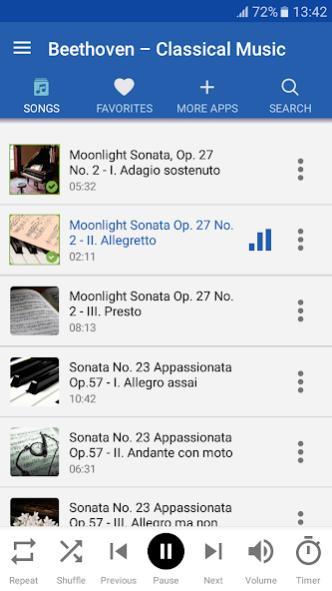
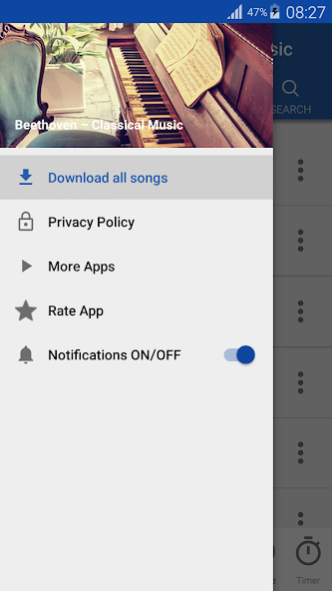
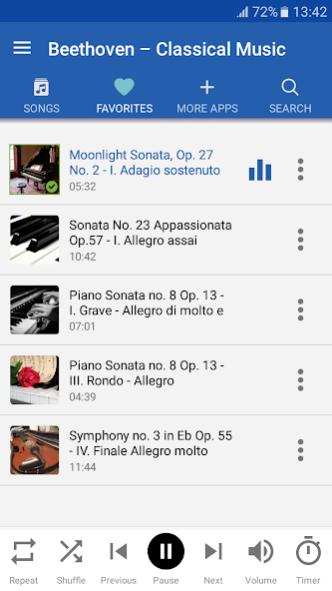

Ludwig van Beethoven is one of the most famous classical music composers.
Enjoy Beethoven's music
and his famous works with Beethoven – Classical Music app.
Beethoven – Classical Music free app enables you to listen to some of the best classical songs or to read Beethoven's biography
. This app is suitable for classical music lovers, adults and is good quality classical music for the youngest. You can listen to Beethoven music just because you are a fan, but there are actually some
health benefits of listening to classical music
: it lowers blood pressure, reduces stress levels, helps you fight depression and anxiety and it enhances memory and alertness. It is suitable for students as a background classical music for studying. If you feel like you need relaxing music you can listen to Beethoven – Classical Music and spend some quality free time. Classical music, especially elegant sounds of Beethoven's 9th symphony or soothing sounds of Moonlight Sonata will help you cope with both emotional and physical pain in numerous ways. Beethoven – Classical Music will elevate your mood and help you get in touch with your emotions.
BEETHOVEN – CLASSICAL MUSIC FEATURES:
Simple to use interface design
Add the best classical music to favorites
Repeat option for one song or the whole play-list
Shuffle option to play random songs
Sleep timer
With this app, you can listen to classical music for free, all the time and everywhere you go. Play Beethoven classical music and
relax with the sounds of Beethoven's Moonlight Sonata, Fur Elise, Ode to Joy or Eroica symphony
. Become familiare with the sounds of famous classical music and Beethoven's compositions.
LUDWIG VAN BEETHOVEN – BIOGRAPHY
Ludwig van Beethoven (baptized on December 17, 1770 – died on March 26, 1827) was a German famous composer and pianist from Bonn. He remains one of the most influential composers of all times.
In order to develop his musical talent, he moved to Vienna in 1787. He hoped to study there with Wolfgang Amadeus Mozart; however, there is only a speculation that Beethoven studied with Mozart. In 1792 Beethoven starts to study piano with Joseph Haydn in Vienna. When the Holy Roman Emperor Joseph II died in 1790, a 19-year-old Beethoven composed a musical memorial in his honor called Cantata on the Death of Emperor Joseph II.
Even though Beethoven struggled with deafness he composed some of the
most famous works in the last years of his life: "Moonlight Sonata", the "Kreutzer" violin sonata, “Missa Solemnis” and “Fidelio”
, his only opera. Beethoven's Ninth and final symphony was completed in 1824 with the text of Friedrich Schiller poem “Ode to Joy”.
COMPATIBILITY:
Beethoven – Classical Music has been tested on HTC One M8, Samsung Galaxy S5, Google Nexus 5, Samsung Galaxy Note S3, LG G2 and Sony Xperia Z1S, among other phones. Compatible with Verizon, AT&T and all other providers. Please report any bugs to milos.p.radovanovic@gmail.com.
LEGAL INFO:
Sounds used in Beethoven – Classical Music are under Public Domain or Creative Commons license, credited in the app, where appropriate. For any questions or concerns regarding license, please contact us at milos.p.radovanovic@gmail.com.
About Beethoven – Classical Music
The company that develops Beethoven – Classical Music is LullabySongs&Music. The latest version released by its developer is 4.0.0.
To install Beethoven – Classical Music on your Android device, just click the green Continue To App button above to start the installation process. The app is listed on our website since 2019-08-22 and was downloaded 0 times. We have already checked if the download link is safe, however for your own protection we recommend that you scan the downloaded app with your antivirus. Your antivirus may detect the Beethoven – Classical Music as malware as malware if the download link to com.bestclassicalcompositions.beethovenclassicalmusic is broken.
How to install Beethoven – Classical Music on your Android device:
- Click on the Continue To App button on our website. This will redirect you to Google Play.
- Once the Beethoven – Classical Music is shown in the Google Play listing of your Android device, you can start its download and installation. Tap on the Install button located below the search bar and to the right of the app icon.
- A pop-up window with the permissions required by Beethoven – Classical Music will be shown. Click on Accept to continue the process.
- Beethoven – Classical Music will be downloaded onto your device, displaying a progress. Once the download completes, the installation will start and you'll get a notification after the installation is finished.
Program Details
System requirements
Download information
Pricing
Version History
version 4.0.0
posted on 2019-08-23
Beethoven Classical Music is now available with more improved design and quality! Enjoy listening to L. van Beethoven!
version 2.2.0
posted on 2016-09-14
- Download option added.,You can now download melodies to your device.,- Minor bugs fixed.,- Enjoy an improved version of Beethoven - Classical Music!
Disclaimer
Official Google Play Link
We do not host Beethoven – Classical Music on our servers. We did not scan it for viruses, adware, spyware or other type of malware. This app is hosted by Google and passed their terms and conditions to be listed there. We recommend caution when installing it.
The Google Play link for Beethoven – Classical Music is provided to you by apps112.com without any warranties, representations or guarantees of any kind, so access it at your own risk.
If you have questions regarding this particular app contact the publisher directly. For questions about the functionalities of apps112.com contact us.
